Meet VibeGram — the in-game messenger where you’ll receive calls, get quests, chat with characters, and claim rewards. It’s your main companion throughout the game.
How it all starts: Calls and quests
Your adventure begins with a call from one of the city’s residents. Don’t worry if you miss it — the story won’t end!
-
Answer a call: You’ll see an animated interface with the character’s avatar. Tap “Answer” to jump into the conversation and learn about your first quest.
-
Miss a call: If you don’t answer in time or tap “Decline,” that’s fine. A few seconds later, you’ll receive a notification with a short summary of the conversation, which will automatically turn into a quest tracker on your screen.
VibeGram: Your quest hub
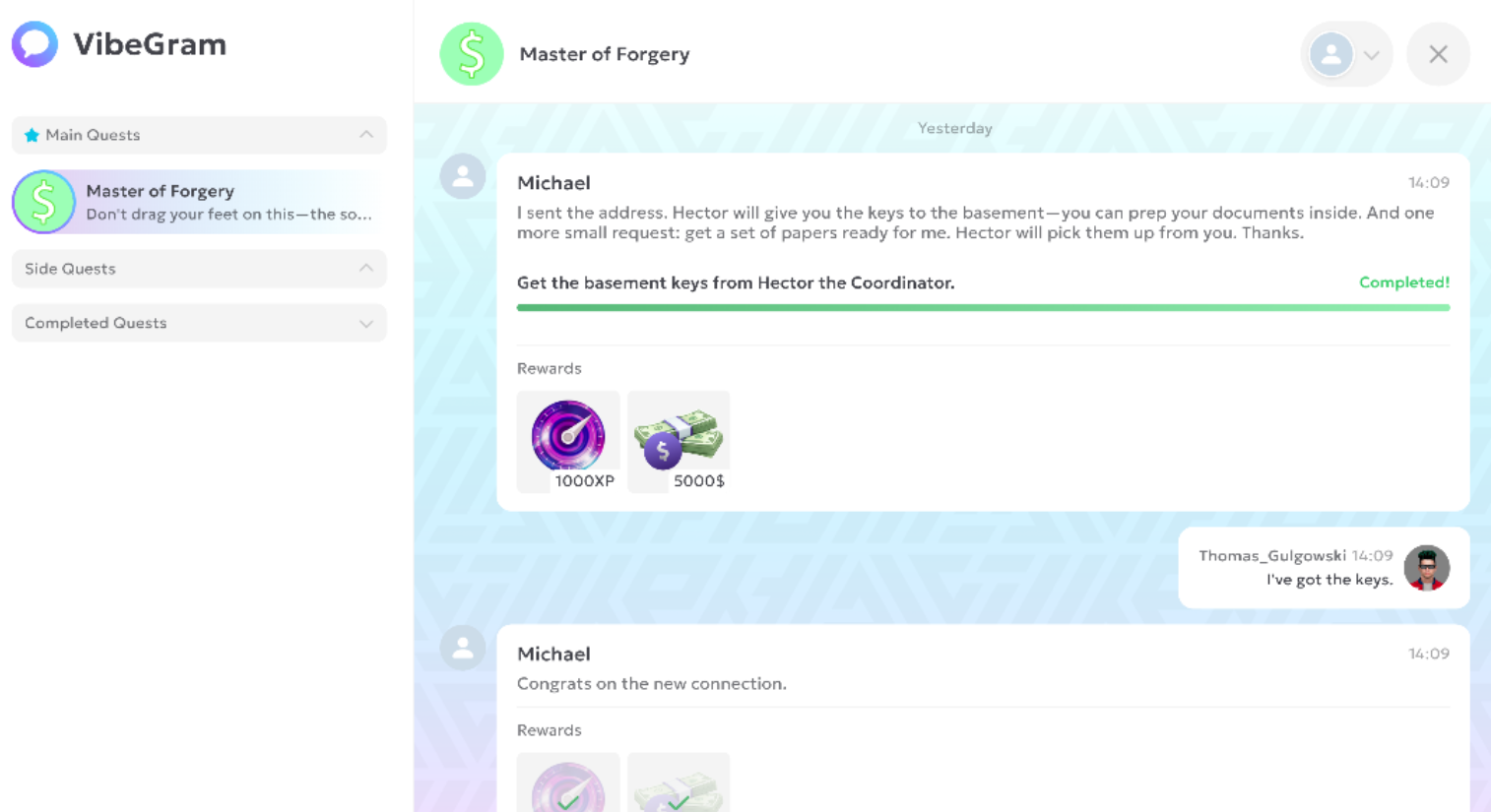
You can open the messenger via its icon on your tablet or on the HUD. The interface looks like a familiar chat app and is split into three key tabs:
-
Main Quests: Where the main story unfolds.
-
Side Quests: Optional stories, contracts, and activities. A great way to earn extra resources and learn more about the world.
-
Completed Quests: An archive of all quests you’ve finished.
Each quest is a separate chat. Inside, you’ll find:
-
A message thread with story beats and clarifications from NPCs
-
A goal list (checklist) with progress (e.g., 1/3)
-
Rewards you can claim прямо in the dialogue
-
Action buttons: “Accept Quest,” “GPS,” “Complete Quest”
FAQ
Q: I’m a new player and VibeGram is empty. Is that normal?
A: Yes, totally normal! Your first quest becomes available after a short introduction. Keep playing — you’ll get your first call or message very soon.
Q: What happens if I don’t complete a side quest?
A: Nothing bad! Side quests don’t block main story progress. You can do them later or skip them entirely — it’s up to you.
Q: I missed a call and don’t remember what to do. Where can I find the quest?
A: Open VibeGram and go to the relevant quest chat. You’ll see the full conversation history and your current objectives. The active quest is also always shown on the HUD tracker.
Q: Why am I not getting a new main quest?
A: You probably haven’t met the requirements yet. New story steps may unlock after you reach a certain level, finish the previous quest, or learn a mechanic. Keep playing, explore the world, and complete side quests — new calls will come soon!
Helpful tips for new players
-
Check VibeGram regularly — it’s where you’ll get objective updates and rewards.
-
Use the buttons in the chat. “GPS” instantly shows the path to your objective on the map.
Good luck!