We’ve completely reworked the item storage system in the game! Your belongings are now better protected, and using storage containers is much more convenient.
What has changed in properties?
In each of your properties (house, apartment, garage), you now have access to three separate storage types:
1. Closet
-
Purpose: Stores clothing (skins), accessories, and weapons.
-
Access: Property owner only.
-
Capacity: 100 slots.
-
You can store: Skins, accessories, weapons only.
-
You CAN’T store: Food, drinks, documents, cases.
2. Fridge
-
Purpose: Stores food and drinks.
-
Access: Everyone inside the property.
-
Capacity: 25 slots.
-
You can store: Food and drinks only.
-
Note: Requires purchasing an upgrade to install.
3. Safe
-
Purpose: Stores in-game currency.
-
Access: Property owner only.
-
Limits: Depend on the property class:
-
High class: up to $50,000,000
-
Mid class: up to $20,000,000
-
Low class: up to $5,000,000
-
Garage: up to $1,000,000
-
-
Note: Requires purchasing an upgrade to install.
Vehicle trunk
Personal vehicles:
-
Access: Vehicle owner only.
-
Capacity: 25 slots.
-
You can store: Skins, accessories, weapons, and most in-game items.
-
You CAN’T store: Food, drinks, documents, cases.
Family vehicles:
-
Access: All family members.
-
Only the item’s owner or the vehicle owner can take an item out.
Your character Inventory
-
Base size: 200 slots.
-
Expansion: You can buy +10 slots for 100 VC.
-
You can store: Any items with no restrictions.
Important safety rules
1. Item protection in shared storage
In fridges and family-vehicle trunks, each item belongs to the player who placed it there.
- If you try to take someone else’s item, you’ll see:
"{Player’s Nickname} owns this item: {Item}"
2. What happens when you sell a property/vehicle?
Closet / Fridge / Trunk:
-
All items are automatically moved to the “Rewards” section.
-
You’ll receive an SMS from the Courier Service with a list of returned items.
Safe:
-
All money is automatically transferred to your bank account.
-
You’ll receive an SMS from the Bank confirming it.
3. What happens if you lose your property (non-payment/inactivity)?
-
All items from the closet and fridge are moved to “Rewards.”
-
Money from the safe is transferred to your bank account.
-
You’ll receive the relevant notifications.
New interface features
In all storage types (except the safe), you now have:
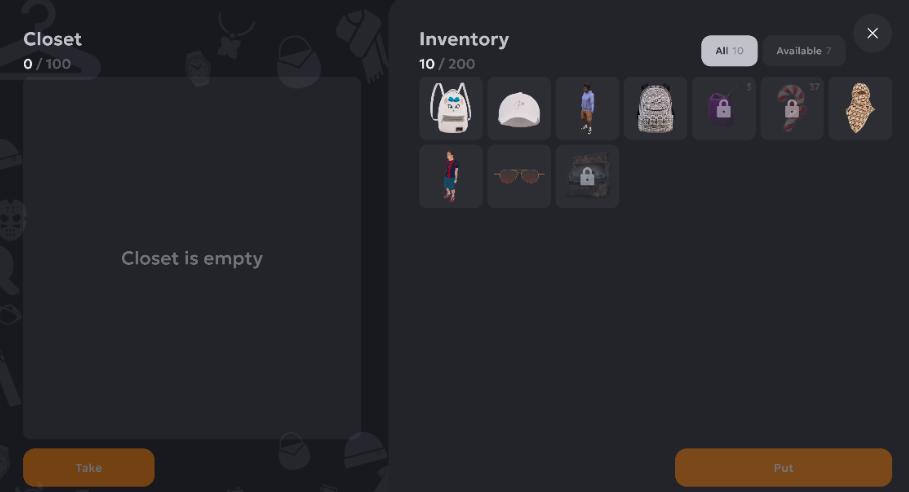
1. Drag & Drop
-
Drag items between slots with an intuitive motion.
-
Visual indicators will show where you can move the item.
2. Stack splitting
-
Tap “Put” or “Take” → a slider will appear to choose the quantity.
-
Great for moving only part of a stack.
3. Multi-select
-
Select multiple items at once.
-
Move or use the entire group in one action.
How to access storage
In properties:
-
Closet / Fridge: Walk up to the object → the “Open” button will appear.
-
Safe: Open it via the property management interface.
In vehicles:
- Walk up to the vehicle → in the radial menu, select “Trunk.”
FAQ
Q: Where did my items from the old shared closet go?
A: After the update, all items from the old storage were automatically moved to the “Rewards” section. Check it in your Inventory.
Q: Why can’t I take food from my friend’s fridge?
A: The fridge is shared storage. If your friend placed the food there, only they or the apartment owner can take it.
Q: What if I sold my apartment and forgot to take my items out of the closet?
A: Don’t worry! All items are automatically moved to “Rewards.” You’ll get an SMS notification.
Q: Can I increase the closet or fridge capacity?
A: Right now, capacity is fixed: Closet — 100 slots, Fridge — 25 slots.
Q: Where do I store cases and documents now?
A: Cases and documents can only be stored in your character Inventory.
Q: How do I know which items in shared storage are mine?
A: In shared storage, other players’ items are marked with a lock icon. Tapping them shows the owner.
Important for property owners!
If you owned a property before the update:
-
All items from the old storage have been moved to “Rewards.”
-
Check the “Rewards” section in your Inventory.
-
The new storage containers are empty and ready to use.